
At some point every growing business asks the same question: can we create a web app from Excel files we already depend on? Usually the question arrives after a bad week. Someone overwrote a formula. Two people saved conflicting versions. A file that opened in two seconds now takes a minute. The spreadsheet still works, technically, but it has quietly become the most fragile part of the operation.
The good news is that you rarely have to throw any of it away. The logic you built over the years is worth keeping. It simply needs a stronger home. In this article we'll cover when it makes sense to move, what happens to your formulas and macros, which build route fits your situation, what the work costs, and how to get through it without breaking the process your team relies on every day.

Spreadsheets are everywhere for good reason. They are fast, familiar, and free of gatekeepers. According to Microsoft’s 2025 Work Trend Index, the study draws on data from 31,000 workers across 31 countries and trillions of Microsoft 365 productivity signals, showing that tools like Excel remain deeply embedded in everyday workflows across industries.
At the same time, academic research such as the Alpha Excel Benchmark study estimates that around 1.5 billion people worldwide use Microsoft Excel, underscoring its massive global footprint in business operations and decision-making. So if your business runs on one, you have plenty of company.
The trouble starts as the file grows. A workbook built for one person doing one job becomes a shared system holding customer records, pricing, and reporting. It was never designed for that. The cracks show up in familiar ways: version confusion, broken links, slow loading, and no way to see who changed what. A web app from Excel fixes the structural problem rather than patching the symptoms.
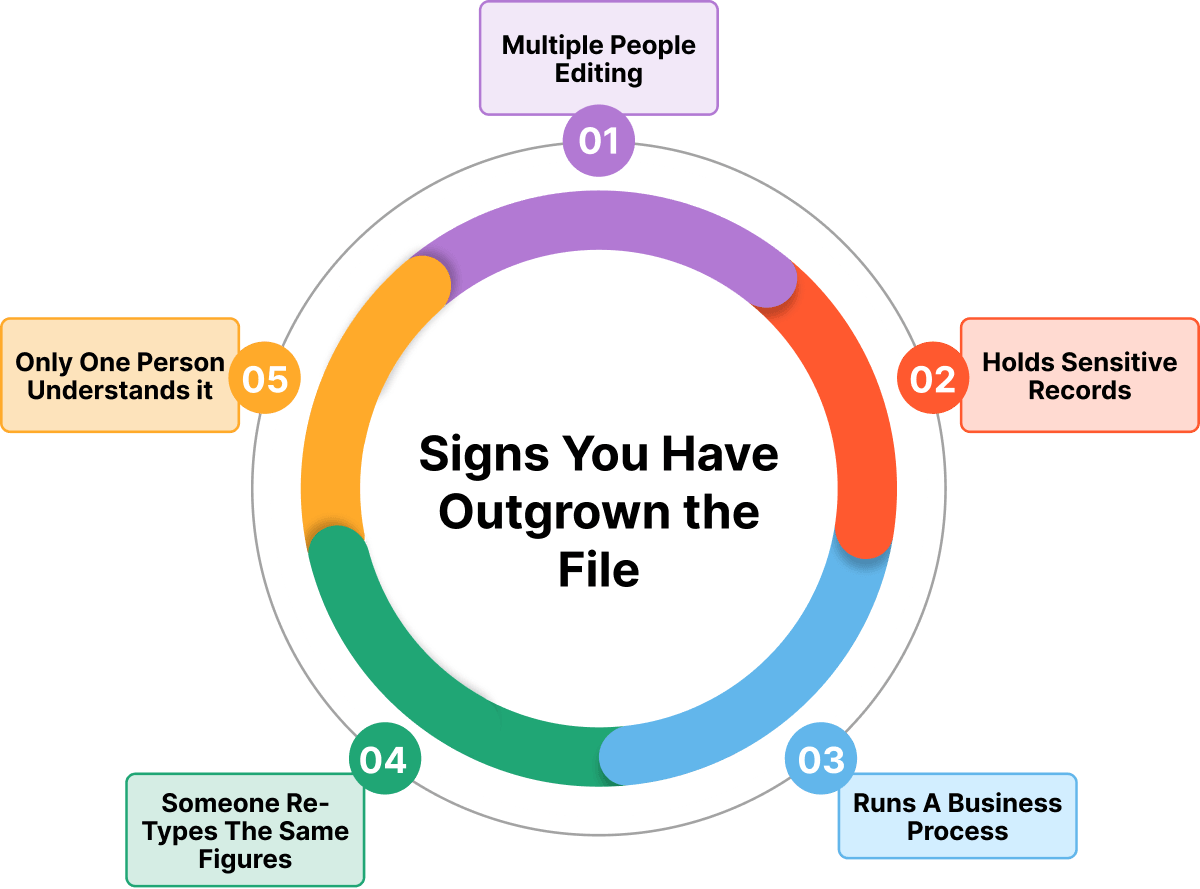
Not every spreadsheet needs to become an app. Plenty of them are fine exactly as they are. The move makes sense when you recognize several of these signs at once.
The cost of staying put is easy to underestimate. According to the McKinsey Global Institute’s report on AI and the future of work, up to 57% of current work hours could be automated using existing technologies, much of it tied to repetitive, rules-based tasks like data entry and processing.
This is the question that stops most projects before they start: what happens to years of carefully built calculations? Moving the formula from Excel to web app code is more straightforward than people fear. A formula is a rule, and rules translate cleanly. The developer reads what the cell does and writes the same rule in the application, where it runs faster and cannot be overwritten by a stray keystroke.
Macros and VBA are a different conversation. They usually can be rebuilt, but they are rewritten rather than copied. Often that turns out to be a gift. Many macros exist to paper over a limitation that disappears once you have a real database behind you. Here is roughly how the pieces travel:
One practical tip: keep the original workbook untouched during the build. It is your reference and your fallback. Anyone asking how to move Excel from web to app environments safely should treat the file as read-only history rather than something to migrate and abandon.

API web development work sits at the heart of this stage, because the app has to talk to a database and often to other systems too. When you create a web app from Excel spreadsheet files, the records themselves need a new home. That home is a database, and the choice matters less than most people expect.
PostgreSQL and MySQL are both solid, well supported, and free to run. Teams often ask how to create a MySQL database web app from Excel exports specifically, and the process is unglamorous: map each sheet to a table, define what each column holds, import the rows, then check the totals against the original. The import itself is quick. The mapping and the checking are where the care goes.
Two things change for the better once records live in a database. First, several people can work at the same time without stepping on each other. Second, every change is logged, so you can always see who did what and when. That alone resolves most of the arguments a shared file creates.

There is no single right way to do this. The route depends on how complex your process is and how long you need the result to last. Broadly, you can convert Excel to a web-based application form by picking one of three paths.
Tools like Glide, Softr, and Airtable can turn a sheet into a usable app quickly, sometimes in an afternoon. They suit simple lists, trackers, and forms. Interest here is not slowing down as Gartner projects the low-code development technologies market will reach $58.2 billion by 2029, growing at 14.1% a year. The limits show up with complicated logic, heavy volume, or unusual integrations, and you are tied to the vendor's pricing and roadmap.
Microsoft Power Apps and similar tools sit in the middle. They fit internal tools well and give you more control than a no-code tool and connect neatly to what you already run. They can get expensive per user at scale, and complex requirements still push you toward real development.
A custom excel web application development project costs more upfront and takes longer. In exchange, you get exactly the process you need, you own the code, and nothing caps your growth. This route earns its keep when the workbook drives real revenue, when the logic is genuinely complex, or when you need integrations a platform will not give you.
There’s a simple way to decide. If the file is a list, a platform will probably do. If the file is a process the business depends on, build it properly. Many teams choose to convert Excel spreadsheets to web-based application forms in stages, starting with one workflow and expanding once it proves itself.

Digital transformation in manufacturing shows that the spreadsheet is a great prototype. When you create a web application using Excel as your reference point, you are starting with something invaluable, which is a process that has already been tested by real use over years.
That is why an Excel-based web application usually succeeds where a blank-page project struggles. Your team already knows the workflow, so training is short and adoption is high. The familiar layout can even be echoed in the interface to make the change feel natural rather than imposed.
The mistake to avoid is copying the file exactly. A web-based Excel application that reproduces every quirk of the original inherits its problems too. Keep the logic and drop the workarounds.
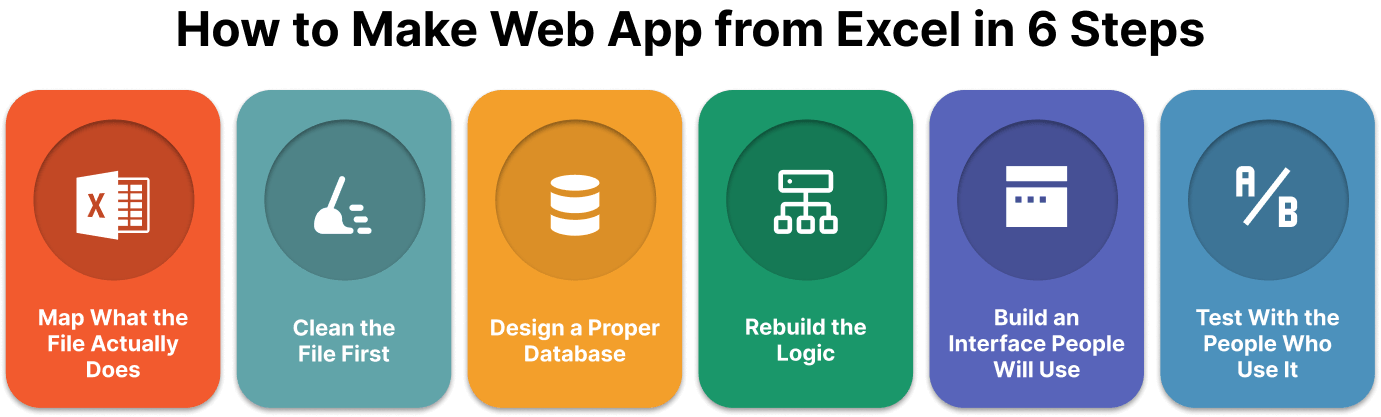
Cloud-based application development follows a fairly predictable path, and the same is true here. Understanding how to make a web app from Excel starts with accepting that the file is your specification. Everything you need is already in it. The job is to read it properly and rebuild it on firmer ground.
Before touching anything, write down what happens in the workbook. Which sheets hold records? Which hold calculations? Which cells does a person type into, and which fill themselves? Who opens it, and what do they do? Most teams discover hidden steps here that nobody documented. This map becomes the blueprint for everything that follows.
Years of use leave a mess: merged cells, blank rows, three date formats, notes typed into number columns. Clean this up before the build starts. It is far cheaper to fix in the spreadsheet than to untangle after import. Decide what is worth keeping and what was only ever a workaround.
This is the step that changes everything. A spreadsheet stores things in a flat grid. An app stores them in structured tables that relate to each other. Customers become one table, orders another, products a third. Once records are structured this way, searching, filtering, and reporting stop being a struggle and start being instant.
Your formulas move into the application layer, where they run on the server rather than inside a cell. This is where calculations become reliable, because nobody can accidentally type over them. More on this below, since it is the part that worries people most.
Here is where you improve on the original. Instead of asking a person to scroll across forty columns, show each role only what they need. Give the warehouse a simple form. Give the manager a dashboard. Add validation so bad entries get caught at the door rather than discovered three weeks later.
Run the app and the spreadsheet side by side for a few weeks. Compare the numbers. If they match, you have built the right thing. If they do not, you have found a rule buried in the workbook that nobody mentioned. This overlap period is the cheapest insurance in the whole project.

Fintech application development and other regulated work make the case plainly that some projects need professional hands. Bringing in a converted Excel to web application development company is worth it when the process is complex, when the records are sensitive, or when downtime would hurt. No need to overcomplicate it. The difference between a reliable partner and a risky one usually comes down to a few practical factors:
A serious Excel web application development partner will ask to see the file early. That is a good sign. The workbook tells them more in ten minutes than a requirements meeting does in two hours.

Mobile payment app projects and spreadsheet conversions share a rule: the price follows the complexity, not the page count. Rough ranges help set expectations.
Budget for maintenance too, usually 15 to 20 percent of the build cost each year. The figure that matters is not the quote. It is the comparison between that quote and what the current file costs you in wasted hours and corrected mistakes. When you create a web application from Excel processes that run daily, the payback period is often shorter than the build.

AI-powered chatbots and similar features become possible once your records sit in a structured database, but the everyday wins matter more. The cost of staying put is easy to underestimate. According to the World Economic Forum Future of Jobs Report 2025, 77% of employers plan to upskill workers to work more effectively alongside new technologies, while 47% expect to reduce workforce tasks through automation.
This shift shows how companies are moving away from manual processes toward more scalable digital solutions. Here is what changes when you finally create a web app from Excel foundations:
No more files named final_v3_updated or endless email chains with conflicting spreadsheet versions. A web app keeps your data centralized, organized, and accessible from one reliable platform.
Instead of sharing entire spreadsheets and hoping users only edit what they should, a custom application allows you to set permissions based on roles. Employees, managers, and external users see only the information and features they need.
Every update is tracked automatically with user details, timestamps, and a clear record of changes. This improves accountability, simplifies compliance, and makes it easier to understand how data evolves over time.
Your team can work with the system from any device, whether they are using a phone on the warehouse floor, a tablet during a client visit, or a laptop from the office or home. No downloads, manual file transfers, or version confusion required.
Unlike traditional spreadsheets that become slow and difficult to manage as data increases, a properly developed web application can handle larger datasets, more users, and more complex workflows without sacrificing performance.
Replace repetitive manual tasks with automated processes such as notifications, approvals, calculations, reporting, and data synchronization. Your team spends less time maintaining spreadsheets and more time focusing on higher-value work.
Multiple users can work in the system at the same time without creating duplicate files or overwriting important information. Everyone works with the latest data in real time.
A web application provides a more controlled environment with secure authentication, backups, and structured data management compared to storing critical business information across individual spreadsheet files.
Nobody sets out to run a company on a spreadsheet. It happens gradually, one useful tab at a time, until the file is quietly holding up the whole operation. Noticing that is the hard part. Fixing it is mostly a matter of sequencing.
Start smaller than feels satisfying. Pick the one workbook that causes the most trouble and rebuild that alone. Keep the old file open beside the new app until the numbers agree. Resist the urge to add features nobody asked for while you are in there. If the first conversion goes well, the second is easier and the third is routine. The years of thinking baked into that file are an asset. Give them somewhere better to live.


CTO & Technology Strategist
Andrei is the Chief Technology Officer at CleverDev Software, with deep expertise in software architecture, cybersecurity, cloud solutions, AI, and blockchain. He designs scalable, secure, and innovative systems that drive business growth. Known for blending technical excellence with strategic vision, Andrei leads teams in building future-ready digital solutions that deliver real value.

Our newsletter is packed with valuable insights, exclusive offers, and helpful resources that can help you grow your business and achieve your goals.


